
Plans
Convella offers Starter, Creator, and Business plans. Each website has its own subscription, allowances, and extra credits.
Member capacity and monthly email allowances depend on your plan and audience tier. Creator and Business also include paid memberships and the option to remove Convella’s footer badge.
Click Manage plan to compare the available plans and prices, switch between monthly and annual billing, or cancel. Your plan is highlighted with a Current plan badge in the comparison. Its Current plan button is disabled unless you have a scheduled change to undo; select the other billing interval to switch between monthly and yearly billing. Audience-tier increases are handled automatically as described below; there is no separate Change member tier action. Member tiers are separate from the membership prices you charge your readers.
Changing plans
After purchasing a plan through Upgrade now, returning from checkout closes the pricing dialog and shows an upgrade confirmation with your plan name when available and a reminder of where to manage billing. Click Continue to return to your work. If your plan is still updating, its features and allowances refresh automatically. Changes generally take effect immediately, with a prorated credit or charge. A lower-priced plan on the same billing interval, or a switch from annual to monthly billing, is scheduled for the end of your current billing period. Review the price and timing in the confirmation dialog. If you have a scheduled change, choose Keep current plan to cancel it.Free trial
Your 14-day free trial lets you create and customize your website. Choose a paid plan when you’re ready to launch.If your trial ends without a paid plan, your website and content are saved. Choose a plan to restore access and continue working.
Usage
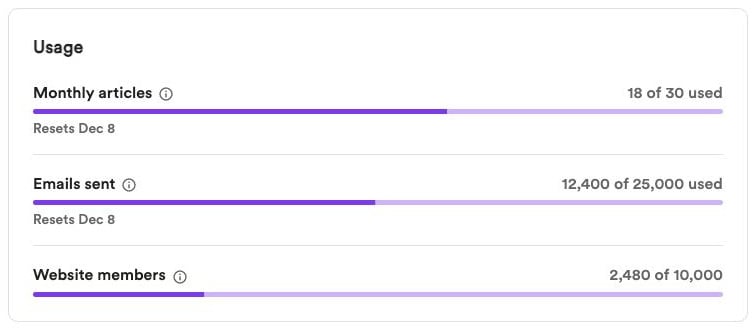
Open Settings → Billing → Usage to see:- Articles from videos — Manual and automatic conversions share the same monthly allowance. Each video you convert counts as one article.
- Emails sent — One email to one recipient counts as one send, including test emails. Sending an article to 100 recipients uses 100 sends.
- Website members — Your current free and paid members. This count doesn’t reset monthly.
Manual conversions use your monthly allowance first, then extra credits. Articles you write yourself are unlimited and use no credits.
Member limits and automatic upgrades
A warning appears in the app when you reach 80% of your member limit. For Creator and Business tiers with a larger tier available, Convella also emails the owner at 90%, then automatically upgrades to the next applicable audience tier when the limit is reached. The billing interval stays the same, prorated charges apply, and the owner receives an upgrade email. Starter stops at 1,000 members and requires you to choose Creator or Business to grow further. At the largest available tier, contact support. New members can’t join while the website is at its limit and no higher tier has taken effect.Email limits
Usage shows a warning at 80% of your email allowance. If a newsletter would exceed your remaining allowance, it isn’t sent. Wait for the reset or change to a plan with a suitable allowance; publishing to your website remains available. Email usage doesn’t automatically upgrade your plan.Extra article credits
One extra credit converts one video. For example, if you select five videos and your monthly allowance covers three of them, you’ll use two extra credits.1
Open Video credits
Go to Settings → Billing → Video credits and click Buy more.
2
Choose a credit pack
Select 10, 25, 50, or 100 credits at $1 per credit, click Continue, and complete payment.
Payment details and invoices
Under Plan, click Manage billing to update your payment method, view invoices, and manage billing details.Cancel your subscription
Open Manage plan, click the red Cancel subscription button at the bottom left beside the billing links, and confirm. Your plan remains active until the end date shown and won’t renew. You can choose Keep current plan before that date to undo the cancellation.When the plan ends, paid features and public website access end. Your content is preserved. Cancellation also removes any scheduled plan change.