
New and existing video automations share your plan’s monthly allowance for articles from videos, using one article per video. New uploads get priority; any allowance left at the end of each monthly cycle is used for existing videos when that automation is enabled. Automations don’t spend your extra article credits. Learn about usage and credits.
New videos
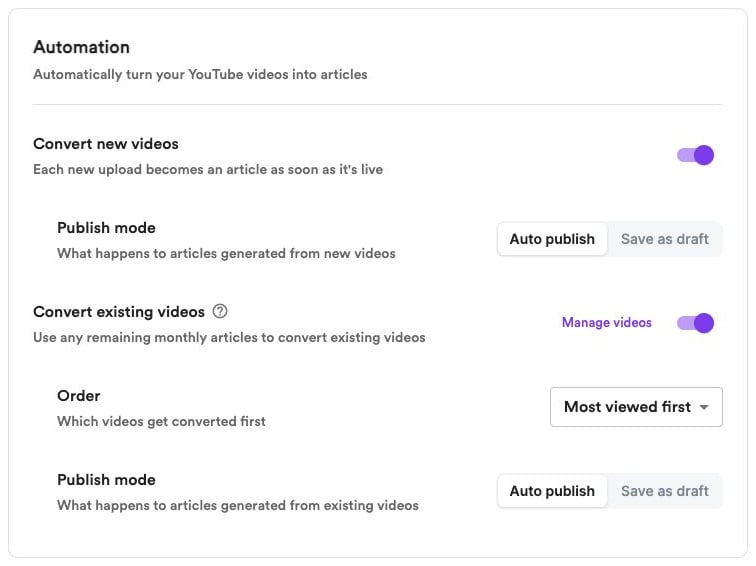
Turn on Convert new videos to automatically create articles as you publish new videos on YouTube. Then choose a Publish mode to publish them automatically or save them as drafts. If you use up your monthly allowance, eligible new uploads wait. When your allowance resets, waiting uploads get priority, oldest first.Existing videos
Turn on Convert existing videos to gradually turn your existing YouTube videos into articles using your remaining monthly allowance. This automation has its own Publish mode, so you can handle existing videos differently from new uploads. Use Order to choose which videos are converted first:- Newest first — Start with your most recently uploaded existing videos.
- Most viewed first — Start with the existing videos that have the most YouTube views.
Manage your videos
Click Manage videos to view your channel’s videos. Open a video’s menu to:- Prioritize for automation — Move it ahead of your saved video order for the next available automatic conversion batch.
- Remove from automation — Exclude it from automatic conversion.
- Add to automation — Include a previously excluded video again.
Publishing options
Choose a Publish mode separately for new and existing videos:- Auto publish — Publish articles as soon as they’re generated.
- Save as draft — Keep articles unpublished so you can review and edit them first.