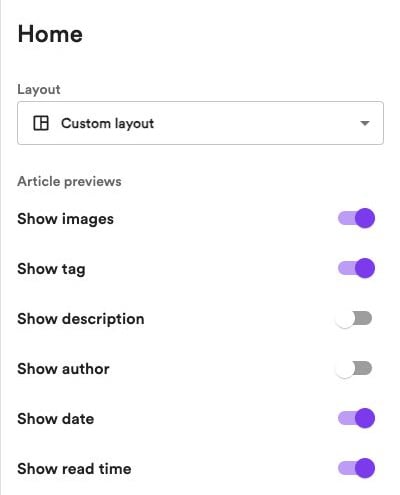
Choose a layout
Under Home → Layout, choose how to organize your homepage:- Single feed — Display your articles in one feed.
- Custom layout — Build your homepage from sections you can add, customize, and rearrange.
Hero
The hero is the introductory section at the top of your homepage. Select Hero under Home to customize it:- Content — Edit the title and subtitle, show an email signup form, and add an image beside your text. When an image is present, you can adjust its position and size.
- Background — Add a background image or video. Upload a file, or choose Clip from YouTube video for a video background. Adjust the background mask to keep your text readable.
- Colors — Choose the hero’s section color theme.
Custom sections
With Custom layout selected, click Add section under Home. Choose from four section types.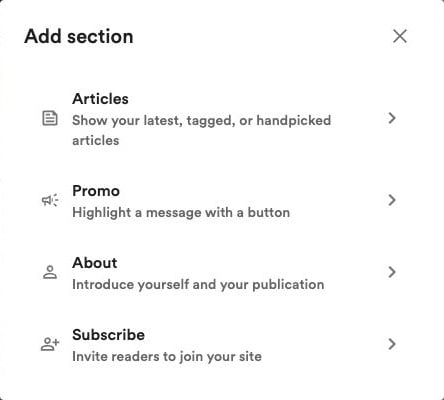
Articles
Choose a Source for the articles in this section:- Latest — Your most recent articles.
- Popular — Articles ranked by their source videos’ YouTube view counts.
- Handpicked — Select and arrange specific articles yourself.
- Tags — Choose a tag to show articles associated with it.
Promo
Highlight a product, service, or offer. Add a title, description, image, and a button linking to your chosen destination.About
Introduce yourself or your website with a description, image, and optional button.Subscribe
Invite visitors to join your audience. Customize the text, image, and subscribe button. Enable Show email field to let visitors enter their email directly in the section.Email signup forms require newsletters to be enabled. You can manage them in Newsletter settings.
Customize and arrange sections
Select a section in the editor’s sidebar to open its controls:- Content — Edit text, images, links, or the article source.
- Design — Adjust layouts, alignment, image sizes, and other display options available for that section.
- Colors — Use your site’s default section theme or choose a different one.
Article previews
Under Home → Article previews, choose which details appear in your homepage’s article previews:- Show images
- Show tag
- Show description
- Show author
- Show date
- Show read time